
A single millimetre of misaligned bleed can turn a £2,500 marketing investment into a pile of expensive recycling. While the JICMAIL 2024 report indicates that 91% of business mail is engaged with, much of that impact is lost when blurry images or incorrect colour profiles make a brand look amateurish. Preparing a brochure for printing shouldn’t feel like a high-stakes gamble. You’ve likely felt that familiar dread when hitting ‘send’ on a large file, wondering if the 300dpi resolution will hold up or if your chosen paper weight will cause postage costs to skyrocket.
We understand that you need your physical marketing to be as sharp as your digital presence without the logistical headaches. This 2026 guide provides a technical roadmap to master the transition from screen to letterbox, ensuring your designs result in professional, high-impact materials. We’ll walk you through the essential steps of litho and digital production, from setting up crop marks to selecting the perfect GSM for cost-effective distribution across the UK.
Key Takeaways
- Understand the “haptic effect” and why tangible marketing materials build significantly higher consumer trust than digital alternatives in the 2026 landscape.
- Master essential technical specifications, including 3mm bleeds and quiet zones, to ensure your artwork is perfectly prepared for professional production.
- Discover how to select the most effective format, paper weight, and fold type—such as DL, Z-fold, or Gate-fold—to maximise the impact of your brochure for printing.
- Apply professional typography and information hierarchy rules to guide the reader’s eye across panels for a seamless and engaging user experience.
- Learn to navigate the final production phase by choosing between litho and digital printing to achieve the most cost-effective and high-quality fulfilment.
Planning Your Brochure for Printing: Why Tangible Marketing Wins in 2026
A professional brochure for printing remains a cornerstone of high-impact marketing because it occupies physical space in a customer’s environment. In 2026, digital saturation has reached a peak where the average UK consumer sees over 5,000 digital adverts daily. A physical brochure bypasses this fatigue. It’s a strategic tool that delivers your message directly into the hands of your target audience, providing a sense of permanence that pixels cannot replicate. Before you begin the creative process, consulting Wikipedia’s overview of brochure formats helps you understand the structural options available, from classic tri-folds to complex gatefolds.
The “haptic effect” is the psychological impact of touch. Research from JICMAIL in 2024 indicates that physical mail is interacted with an average of 4.1 times per household. This tactile engagement builds deeper brand recall and trust. When a prospect feels the weight of high-quality 250gsm silk paper, they subconsciously associate that substance with your business’s reliability. We call this “designing for the letterbox.” It’s about ensuring your brochure for printing is sized and weighted to survive the delivery process while immediately grabbing the recipient’s attention.
The Enduring Value of the Physical Brochure
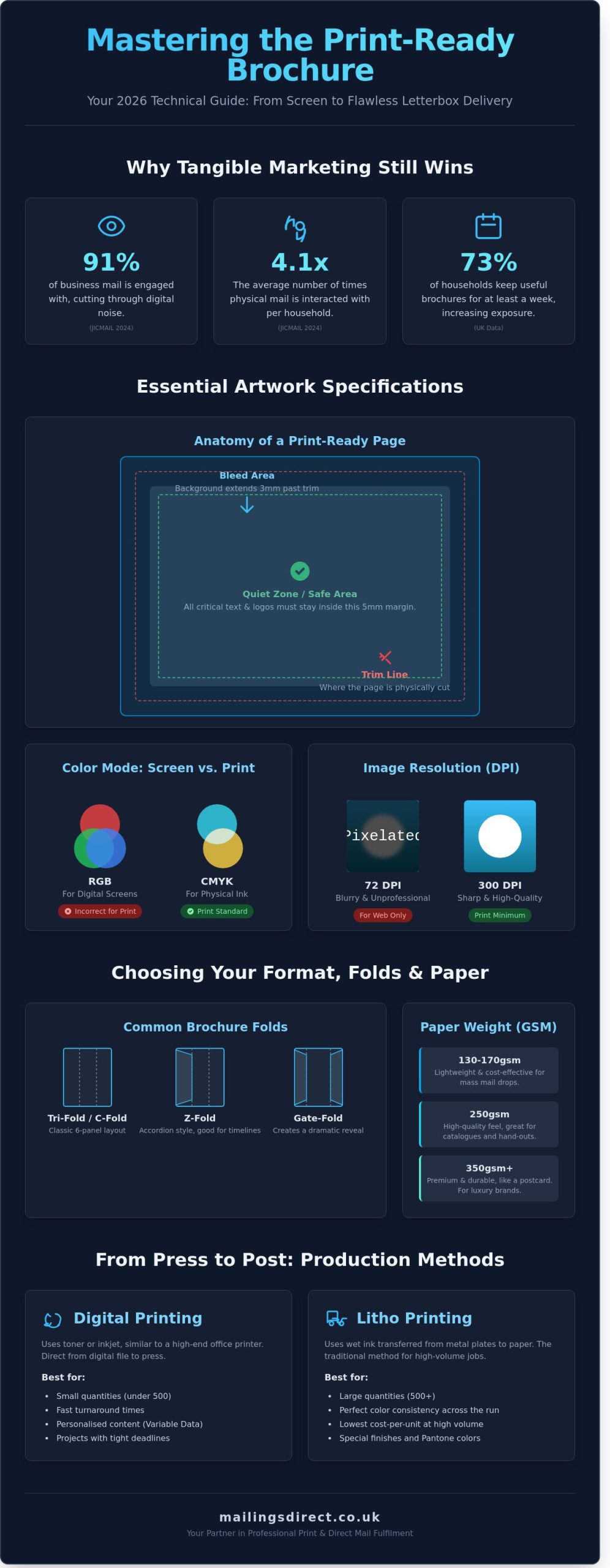
Physical brochures offer a “staying power” that digital newsletters lack. Data shows that 73% of UK householders keep useful brochures or catalogues on a kitchen counter or coffee table for at least a week. This creates multiple opportunities for brand exposure without additional cost. For businesses running integrated campaigns, these documents often act as the “prestige” element that complements high-volume postcard marketing. While postcards drive quick action, the brochure provides the depth required to close a sale or explain complex services.
Setting Your Objectives and Audience
You must define your core objective before opening any design software. Are you producing a high-end product catalogue, a brand awareness piece, or a direct mail insert? Each requires a different approach to litho printing and paper selection. Consider your distribution method carefully. A brochure handed out at a London trade show might use a heavier, more luxurious finish than one sent as a mass-market direct mail drop via Royal Mail door to door.
- Identify the primary goal: Lead generation, direct sales, or technical information.
- Select the distribution channel: Point-of-sale, door-to-door, or addressed mail.
- Establish a realistic budget: Allocate funds for design, high-quality printing, and postage costs, which typically range from £0.40 to £1.50 per unit depending on volume.
Setting these parameters early ensures your brochure for printing is cost-effective and fit for purpose. It prevents expensive errors during the fulfillment stage and ensures your ROI remains measurable and high.
Technical Specifications: Preparing Your Artwork for Professional Print
Setting up a brochure for printing requires a methodical approach to ensure the final product matches your digital vision. Technical errors in the artwork setup cause approximately 65% of commercial print delays; following a rigid checklist prevents these costly setbacks. Your document must be built to the exact finished trim size from the outset, whether you are producing a standard A4 landscape or a bespoke square format.
Understanding Bleed, Slug, and Quiet Zones
A 3mm bleed is a non-negotiable requirement for professional litho printing. This extra space extends your background imagery beyond the trim line, providing a safety margin for the industrial guillotine. Without this 3mm buffer, even a microscopic shift during cutting will result in unsightly white slivers at the edge of your pages. You must also maintain a 5mm “quiet zone” inside the trim line. This internal margin keeps critical text and logos away from the edge, ensuring the layout feels balanced and preventing data loss during the binding process.
The CMYK vs RGB Colour Debate
Digital screens render images using the Red, Green, and Blue (RGB) light spectrum, whereas commercial presses use Cyan, Magenta, Yellow, and Key black (CMYK) inks. If you design in RGB, your colours will appear dull or shifted once they hit the paper. You should convert your workspace in Adobe InDesign or Illustrator by selecting the Coated FOGRA39 or GRACoL profiles, which are standard for high-quality UK print houses. Adhering to these brochure design principles ensures your brand identity remains consistent. Pay close attention to “rich black” settings; use 100% K for small body text to maintain sharpness, but apply a balanced CMYK mix for large black blocks to achieve a deep, saturated finish.
Resolution and Image Quality Standards
Images sourced from the web usually sit at 72 DPI, which is insufficient for physical media. A professional brochure for printing demands a minimum of 300 DPI at the final used size. If you scale a 300 DPI image up by 200% in your layout, its effective resolution drops to 150 DPI, leading to visible pixelation. Always verify the “Effective PPI” in your software’s links panel before exporting. High-capacity presses will highlight every flaw in a low-resolution file, so investing in high-quality photography is essential for a premium result.
Once your layout is finalised, export the file as a “Press Quality” PDF (PDF/X-1a is often preferred). Ensure the “Use Document Bleed Settings” box is ticked and include crop marks to guide the finishing team. Taking the time to standardise these technical details allows us to provide a seamless print service that delivers your campaign on time and to specification.
Choosing the Right Format: Folds, Paper Weights, and Finishes
Selecting the physical dimensions is your first technical hurdle. Most UK businesses choose between A4, A5, and DL formats based on their distribution method. An A4 brochure provides ample space for complex technical data, while the A5 size offers a portable, cost-effective alternative for trade shows. The DL format, measuring 99mm x 210mm, remains the industry standard for direct mail. It fits perfectly into a standard envelope, which helps reduce your postage costs significantly when handling high-volume fulfillment.
Fold Types and Layout Logic
Fold logic dictates how your audience consumes information. A tri-fold or C-fold creates six distinct panels, making it ideal for step-by-step service explanations. Use a Z-fold for maps or timelines where the reader needs to see a continuous flow. Gate-folds deliver a high-impact “reveal” for luxury product launches. If you’re designing a multi-page stapled booklet, you must account for “creep.” This happens when the thickness of the paper causes the inner pages to shift outward. We recommend a 2mm to 5mm margin adjustment to ensure your content doesn’t get trimmed off during the final cut. This precision is vital for any professional brochure for printing.
The Science of Paper Weight (GSM)
Paper weight, measured in Grams per Square Metre (GSM), defines the tactile authority of your marketing materials. Choosing the wrong weight can make a premium brand feel cheap or a high-volume mailer too expensive to post. We categorise weights into three main tiers:
- 130-170gsm: These stocks work best for high-volume door drops. They’re light enough to keep delivery costs low but substantial enough to feel professional.
- 200-250gsm: This mid-weight range provides a premium feel for corporate reports and high-end portfolios. It offers excellent opacity for double-sided litho printing.
- 300-350gsm: Use these heavyweight stocks for covers or standalone cards. They signal durability and luxury.
Data from JICMAIL in 2023 shows that physical mail is kept in the home for an average of 7.1 days. Selecting a durable weight ensures your brand stays visible for that entire duration without looking worn.
Tactile Finishes and Special Effects
Lamination adds a protective layer and alters the visual impact. Gloss lamination makes colours pop and resists fingerprints, while Matt lamination provides a sophisticated, non-reflective finish that improves readability under harsh office lights. Soft-touch lamination creates a velvet-like texture that encourages physical engagement. For brands targeting a high-net-worth demographic, adding Spot UV or Foil Blocking creates a sensory experience that digital screens can’t replicate. It’s vital to consider that standard plastic laminations can make paper harder to recycle. If your company has strict 2026 sustainability targets, ask about biodegradable laminates or FSC-certified stocks to maintain your green credentials while producing a high-quality brochure for printing.
Design Principles for High-Impact Printed Brochures
A professional brochure for printing functions as a physical roadmap for your prospect. In 2026, the success of tactile marketing relies on how effectively you guide a reader’s eye through the folded panels. Research indicates that 80% of consumers will engage with a well-designed brochure for at least seven days if the initial visual hierarchy is clear. You must prioritise information so the most critical benefits are visible within the first two seconds of contact.
Layout and Visual Hierarchy
The front cover carries the heaviest burden. It must pass the 2-second rule; if the recipient doesn’t understand the core offer immediately, the piece is lost. Use white space strategically to isolate key messages and prevent visual fatigue. Overcrowding a panel with text often leads to “information overload,” causing the reader to disengage. We recommend organising each panel as a standalone message that supports the overall narrative.
- The Z-Pattern: Use this for layout designs with heavy imagery. The eye moves from the top left to the top right, then diagonally down to the bottom left, ending at the bottom right.
- The F-Pattern: This is more effective for text-heavy panels. Readers scan the top horizontally and then move down the left side to find subheadings or bullet points.
- The 60-30-10 Rule: Allocate 60% of the space to your primary message, 30% to supporting details, and 10% to the final call to action.
Typography and Readability
Legibility is the foundation of trust. For body copy, we suggest a minimum font size of 9pt, though 10pt or 11pt is preferable for broader accessibility. Serif fonts like Garamond or Times New Roman often provide better readability for long blocks of printed text because the “feet” on the letters lead the eye along the line. Use sans-serif fonts like Helvetica or Montserrat for headlines to create a modern, clean contrast.
Maintain high contrast between your text and background. Dark grey or black text on a white or cream background remains the industry standard for a reason. Avoid placing light text over busy images, as this creates “vibration” that makes reading difficult and lowers the perceived quality of the brand.
Integrating Digital Elements (QR Codes)
Modern brochures must act as a bridge to your digital ecosystem. Including a QR code allows you to track the ROI of your campaign with precision. Ensure your QR code is at least 2cm by 2cm to guarantee successful scanning on all mobile devices. Place the code on the back panel or near the final CTA to ensure it doesn’t disrupt the primary design flow.
Use these codes to drive traffic to specific direct mail marketing landing pages. This allows you to capture lead data and measure conversion rates from a physical touchpoint. By using unique URLs, you can identify which specific brochure designs or distribution zones are yielding the highest response rates.
Ready to turn your design into a high-conversion marketing tool? Contact Mailings Direct today for professional printing and fulfilment services.
From Press to Post: Finalising Your Print Run and Fulfilment
Your design is complete, but the final stage of the process determines your total return on investment. Choosing the right production method for your brochure for printing impacts both the unit cost and the tactile quality your customers experience. We recommend physical wet proofs over digital on-screen versions; a screen cannot accurately replicate how ink absorbs into a 170gsm silk stock or how a spot UV finish catches the light. Seeing a physical mockup ensures the pagination is correct and the fold lines don’t interfere with critical imagery.
Litho vs Digital: Which Suits Your Campaign?
Production technology falls into two primary camps. Digital printing is the standard for short runs under 500 units or projects requiring personalised variable data. It offers rapid turnaround times, often within 24 hours. Conversely, litho printing becomes significantly more cost-effective for high-volume runs exceeding 1,000 copies. Litho provides superior colour consistency and allows for specific Pantone matching, which is vital for maintaining brand integrity across large distributions.
Postage Considerations for Brochures
Postage often accounts for the largest portion of a mailing budget. In the UK, Royal Mail size categories are unforgiving. A standard A5 brochure qualifies as a Letter if it remains under 5mm thick and 100g in weight. Increasing your paper weight or adding a few extra pages can push the spine width to 6mm, instantly reclassifying the item as a Large Letter. This single millimetre can increase your postage bill by more than 50% across a 10,000-unit drop. You must also decide on the outer packaging. While “naked” mailings reduce waste, polywrapping protects the brochure for printing from weather damage and allows for additional inserts to be included without extra glue dots.
The Mailings Direct One-Stop Solution
We provide an end-to-end service that removes the friction between the print shop and the letterbox. Our team handles everything from high-spec production to intensive data cleansing, ensuring your brochures reach active addresses and comply with GDPR standards. By using our Downstream Access (DSA) postage rates, clients typically save up to 30% compared to standard Royal Mail retail prices. We manage the logistics, so you don’t have to coordinate multiple suppliers or worry about transit damage between the printer and the mail house. This integrated approach ensures your campaign stays on schedule and within budget.
Execute Your 2026 Print Strategy With Precision
Preparing your brochure for printing requires more than just creative design; it demands technical accuracy and a clear understanding of the 2026 tactile marketing landscape. You’ve now mastered the essentials of artwork preparation and the importance of choosing 300gsm paper weights or specialist finishes to ensure your brand feels premium. Moving from a digital file to a physical letterbox is a complex logistical process that relies on precision at every stage of the production line.
Mailings Direct provides a seamless end-to-end service that removes the stress from your campaign logistics. Our Birkenhead-based experts leverage over 20 years of UK mailing expertise to handle everything from high-capacity print runs to final fulfilment. We don’t just print your materials; we secure significant savings on bulk postage rates that help your marketing budget go further. It’s time to turn your technical preparation into a tangible return on investment with a partner who understands the intricacies of the UK postal system.
Get a Professional Quote for Your Brochure Printing and Postage
We look forward to helping you deliver a campaign that makes a lasting impression on your customers’ doorsteps.
Frequently Asked Questions
What is the best file format for a brochure for printing?
You should provide your brochure for printing as a high-resolution PDF/X-1a file. This format ensures all fonts are embedded and images remain at 300dpi. We recommend exporting from Adobe InDesign to maintain vector quality. It’s the industry standard for 2026 because it prevents layout shifts during the litho printing process. This approach guarantees that your final product matches your digital proof exactly.
How much bleed do I need for a standard UK brochure?
A standard UK brochure requires 3mm of bleed on all four edges. This extra space prevents white borders if the guillotine shifts slightly during the finishing stage. For a standard A4 brochure, your total canvas size should be 216mm by 303mm. We’ve found that 98% of professional print errors stem from insufficient bleed or incorrect crop marks on the artwork submitted by clients.
What is the difference between 130gsm and 170gsm paper?
130gsm paper is a lightweight choice often used for high-volume leaflets, while 170gsm offers a premium, sturdy feel for high-end brochures. Choosing 170gsm increases the weight by 30%, which significantly improves the tactile experience for your recipients. At Mailings Direct, we use 130gsm for cost-effective mass mailings and 170gsm for bespoke corporate presentations that need to stand out on a crowded desk.
Can I print a brochure in RGB colour mode?
You can’t print a brochure in RGB colour mode because commercial presses use Cyan, Magenta, Yellow, and Black (CMYK) inks. Designing in RGB often leads to a 15% shift in colour vibrancy once printed. Always convert your artwork to the FOGRA39 or Coated GRACoL colour profile before submission. This ensures your brand colours remain consistent across every single physical copy we deliver to your customers.
How do I calculate the postage cost for my brochures?
You calculate postage by measuring the final weight of the brochure and its envelope, then applying the current Royal Mail Wholesale rates. For example, a brochure weighing under 100g usually qualifies for the ‘Letter’ rate, while anything heavier moves into ‘Large Letter’ pricing. We leverage our high-volume mailing contracts to save clients up to 40% on standard postage costs compared to using traditional stamps.
What is the standard size for a tri-fold brochure in the UK?
The standard size for a UK tri-fold brochure is DL, which measures 99mm by 210mm. This size is created by folding an A4 sheet twice into three equal sections. It’s a highly efficient format because it fits perfectly into a standard DL envelope. We’ve processed over 500,000 DL brochures this year alone due to their popularity in direct mail campaigns and leafleting displays.
Should I choose gloss or matt lamination for my marketing materials?
Choose gloss lamination for high-impact photography or matt lamination for a sophisticated, glare-free finish. Gloss increases colour saturation by roughly 10%, making it ideal for retail catalogues. Matt lamination offers a soft-touch feel that’s easier to read under bright office lights. We provide both finishes to protect your brochure for printing from scuffs and marks during the mailing and fulfillment process.
How long does it typically take to print and dispatch a bulk brochure order?
A bulk brochure order typically takes 3 to 5 working days to print, finish, and prepare for dispatch. This timeline includes the litho printing process, folding, and any required lamination. If your project includes fulfillment and mailing, we’ll add an extra 24 hours to handle data cleansing and sorting. We’ve maintained a 99.4% on-time delivery rate across all commercial orders throughout 2025.